An Inventory management app for Office supplies
A tool for the admin who can manage all the resources and provide them to the employees who request them through a mobile app.
Project Overview
Part of maintaining an efficient office is ensuring that everyone has access to the tools they need. While it can be difficult to decide which tools an office can most benefit from, one resource that the entire office uses is office supplies.
Office supplies are easy to use and easier to run out of. Paper, pens, sticky notes, markers, etc. But can become a hassle if they aren’t monitored. Also, employees may take too many office supplies at once, which can lead to over-ordering and overspending.
Persona
Users’ behaviour in office supplies management and their troubles in doing.
Office Admistrater

Employee Persona

HR Persona

Use cases

Admin’s goal
1. Wants to know the information on users who are using the sharable resources and their time frame.
2. Keeping track and identify office supplies resources stocks.
3. Robust feedback and request mechanism for employees on requests.
Journey map for admin

User Flow

Visual Designs for Admin
Login screen
Admin logs in by filling in mail & password or via OTP into the tool.

Requests page
Admin receives requests from employees which will be listed on the Requests page and accept/reject requests according to the availability of the requested item.

Employee's request details of the office supplies for admin to checks the items and approve.

Shared resource request detail should be booked for the given time as soon as the request is made and should be marked as unavailable to other users.

Resources page
Admin can manage by adding, modifying, deleting the resources which are listed in the resources pages

The item can be made active/ inactive to the employees and can duplicate and delete resources.

The shared resources list shows the availability of the devices.

Restricted supplies list for the admin to track the supplies and to restock.

Admin can add new resources to the system

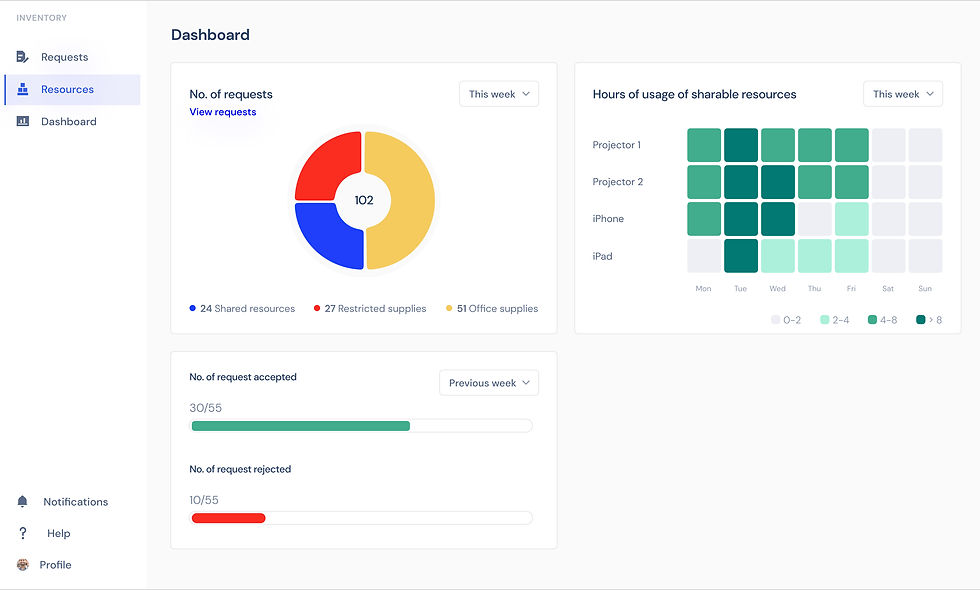
Dashboard
Analytical dashboard to view and analyze data to allow admin to investigate and discover insights
Employee Flow
Employee logs in by filling in mail & password.
Requests for resources. Views her past requests.

Request screen for office supplies

Request screen for sharable resources

Only HR has the access to request for restricted supplies
